
Skip to course content
SCADA World
For engineers connecting devices from different manufacturers

Connect devices withMODBUS RTU / TCP / ASCII

Read the registers, configure the connection and find out why a device is not responding. Learn MODBUS with simulators and practical examples using PLCs, HMIs and drives.

Individual course · One-time purchase · Learn at your own pace
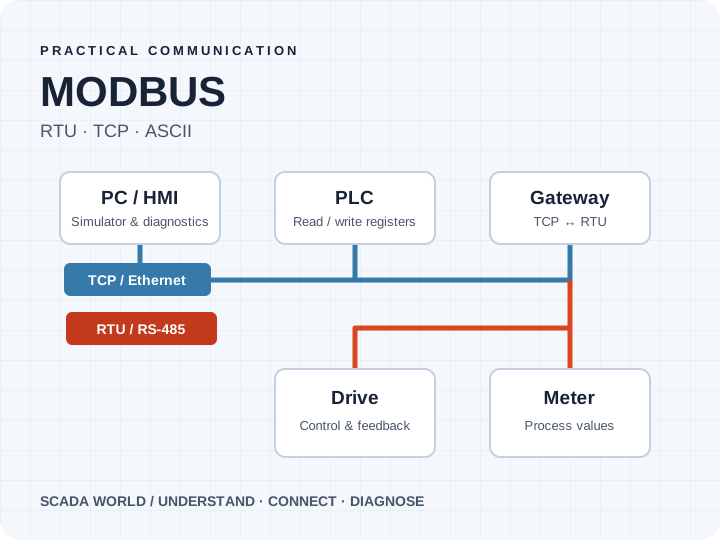
MODBUS TCP and RTU communication between a PC, PLC, gateway, drive and meter
Practical training with Luke Krzesinski
70 lessons · 5 modulesEnglish video lessonsRTU · TCP · ASCII
What you will learn

Know what to check when the device will not respond.

Connect the protocol theory to the settings, registers and messages you see on a real job.

01

Understand the protocol

Read frames, identify function codes and work with the MODBUS memory model.

02

Configure serial communication

Set up MODBUS RTU and ASCII connections and diagnose RS-485 communication.

03

Connect devices over Ethernet

Configure MODBUS TCP between controllers, operator panels and other devices.

04

Practise with simulators

Explore client/server communication, also called master/slave in the course, before connecting hardware.

05

Integrate industrial equipment

Follow examples with Siemens S7-1200, TP700 Comfort, drives, PAC3200 and Node-RED.

06

Troubleshoot methodically

Inspect traffic, interpret error codes and work through communication checks step by step.

Is this for you?

Built around the work you need to do.

  • You connect PLCs, drives, meters or HMIs from different manufacturers.
  • You work in maintenance and need to diagnose unreliable communication.
  • You want to understand registers and frames before tackling your next integration.
Course curriculum

5 modules. A clear path through the material.

From protocol basics and simulation to practical RTU and TCP connections. The agenda groups the topics covered across 70 lessons.

MODULE 01Getting started
  • Welcome and course roadmap
  • How to work through the lessons
  • Requirements and first assignment
MODULE 02MODBUS RTU, ASCII and TCP fundamentals
  • What MODBUS is and how transmission works
  • Transmission media and available functions
  • The MODBUS memory model
  • Sending an RTU frame over RS-485
  • MODBUS master/slave simulators
  • Working with RTU and ASCII simulators
  • RS-485 diagnostics and a troubleshooting checklist
  • Common errors and exception codes
  • TCP versus RTU: differences and similarities
  • Sending TCP frames and using a TCP simulator
  • Inspecting MODBUS TCP traffic
MODULE 03MODBUS RTU in practice
  • Choosing a USB-to-RS-485 adapter
  • S7-1200 and CB1241: MODBUS master configuration
  • Connecting a MODBUS slave simulator
  • USB-to-RS-485 converters in VMware and Hyper-V
  • TP700 Comfort and S7-1200 communication in TIA Portal
  • DELTA, SEW and Siemens drives: connections to PC, PLC and HMI
  • SENTRON PAC3200 configuration and PLC connection
  • Node-RED with S7-1200, DELTA and PAC3200
  • Bonus: ASTRAADA drive connections to PC, PLC and HMI
  • Bonus: connecting an ASTRAADA drive to Node-RED
MODULE 04MODBUS TCP in practice
  • Siemens S7-1200: MODBUS TCP in TIA Portal
  • TP700 Comfort: MODBUS TCP configuration
  • Connecting S7-1200 and HMI over MODBUS TCP
  • SENTRON PAC3200 communication over Ethernet
  • Allen-Bradley: MODBUS TCP in Studio 5000
  • Connecting Siemens S7-1200 and Allen-Bradley over MODBUS TCP
  • Converting between MODBUS RTU and TCP
  • MODBUS RTU over TCP: converters, routers and diagnostics
  • WinCC V7/V8: MODBUS TCP with PAC3200, S7-1200, HMI and Allen-Bradley
  • Working with Node-RED and S7-1200
  • Bonus: ASTRAADA and DELTA drives connected to Allen-Bradley
  • Bonus: converting between MODBUS TCP and RTU
MODULE 05Finishing the course
  • Course completion and certificates
  • Next steps for your own projects
  • Closing lessons
Included bonus lessons

See the drive and gateway in action.

Additional equipment demonstrations created with ASTOR. These are video lessons; hardware is not included.
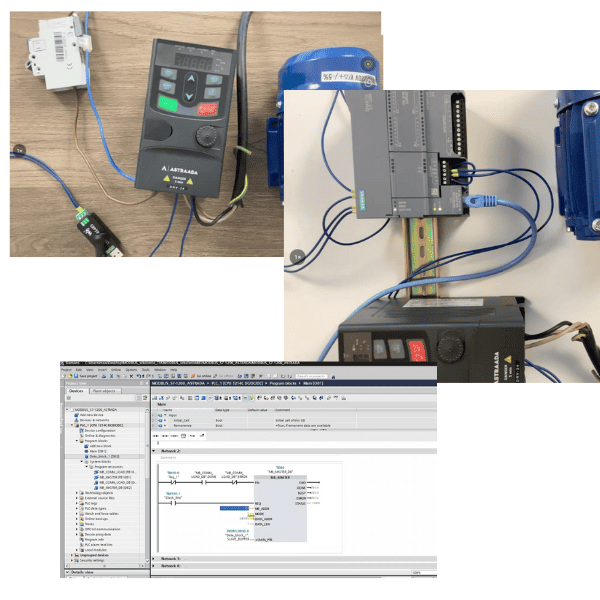
ASTRAADA drive used in the practical MODBUS lessons

ASTRAADA DRV-24 drive

Follow MODBUS RTU connections between an ASTRAADA drive, a PC, a PLC and an HMI, including a Node-RED example.
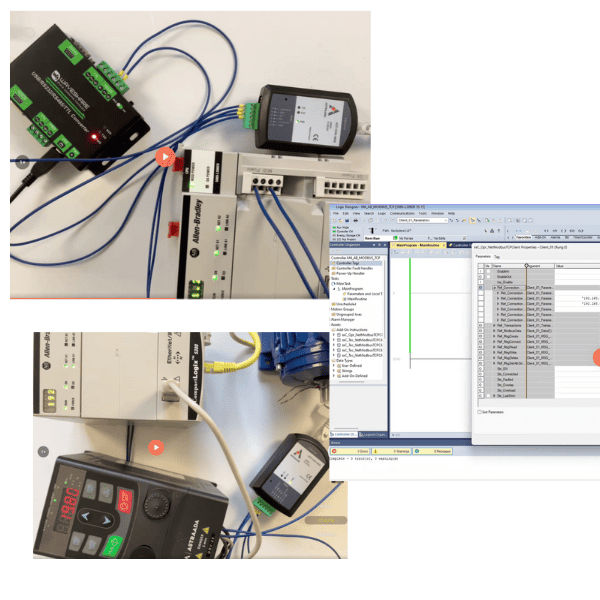
ASTRAADA AST-CON-485E converter used in the MODBUS course

MODBUS TCP to RTU gateway

See the ASTRAADA AST-CON-485E in practice and follow examples connecting ASTRAADA and DELTA drives to Allen-Bradley equipment.

Luke Krzesinski, SCADA World instructor
Meet your instructor

Luke Krzesinski

I'm an automation engineer who has worked in industry since 2008. I've built and modernised more than 140 SCADA systems across manufacturing plants in Poland and Europe.

In these lessons, I explain the configuration step by step and show what happens on screen, so you can understand the decisions behind the setup.

More about Luke →
Watch before you buy

Working with a MODBUS simulator

Watch an English sample lesson and see how the course connects protocol concepts to practical work.

Choose your access

Start with the course you need.

Buy this course on its own, or compare All-Access if you want to learn across several platforms.

Individual course

MODBUS RTU / TCP / ASCII

$99 USD

One-time base price in USD. Final currency and applicable taxes are confirmed at checkout.

  • 70 English lessons across 5 modules
  • RTU, TCP and ASCII fundamentals and practice
  • ASTRAADA drive and gateway bonus lessons
  • One-time purchase with lifetime course access

One-time payment. No subscription for this course.

Eligible purchases are covered by our 30-day money-back guarantee. Read the refund policy. Questions before buying? Email Luke.

Before you join

Your questions, answered.

Is the course in English?

Yes. The lessons are in English. Watch the simulator lesson above before buying to see how the material is explained.

Do I need to buy all the hardware first?

No. You can start with the simulator lessons. Later lessons demonstrate physical PLCs, HMIs, drives and meters. You need the corresponding equipment only if you want to reproduce those exact hardware exercises.

Does this cover RTU, TCP and ASCII?

Yes. The course covers all three, including frames, functions, the memory model, simulators and diagnostics. The practical integration modules focus on RTU and TCP.

Which devices are used?

Examples include Siemens S7-1200, TP700 Comfort, DELTA, SEW and Siemens drives, SENTRON PAC3200 and Node-RED. Bonus lessons use ASTRAADA drives and the AST-CON-485E gateway, including Allen-Bradley integration.

Are the ASTRAADA bonuses hardware or lessons?

They are additional video lessons demonstrating the equipment. No drives, gateways or other physical hardware are included in the purchase.

How long do I have access?

The individual course is a one-time purchase with lifetime access to its lessons. You can revisit the material when you need it for a project.

Can I choose All-Access instead?

Yes. MODBUS is included in All-Access. Compare membership if you also want WinCC, VB scripting or FactoryTalk training.

Make sense of the next MODBUS connection.

Start with the protocol, practise with a simulator, then follow the real-device examples.